Classify Jira Tickets with GenAI on Amazon Bedrock
November 4, 2024 · 9 min read
Overview
Traditionally, text classification has been a machine learning problem. LLMs can classify text out of the box and generalize across categories without task-specific training.
In this post, we'll go over how to set up a Jira ticket classification system using large language models on Amazon Bedrock and other AWS services.
Why Classify Jira Tickets?
A common ask from companies is to understand how teams spend their time. Jira has tagging features, but it can sometimes fall short through human error or lack of granularity. By doing this exercise, organizations can get better insights into their team activities, enabling data-driven decisions about resource allocation, project investment, and deprecation.
Why Not Use Other NLP Approaches?
Traditional ML models and smaller transformers like BERT need hundreds (or thousands) of labeled examples, while LLMs can classify text out of the box. In our Jira ticket classification tests, a prompt-engineering approach matched or beat traditional ML models, processing 10k+ annual tickets for ~$10/year using Claude Haiku (excluding other AWS service costs). Also, prompts are easier to update than retraining models.
Code Sample
This github repo contains a sample application that connects to Jira Cloud, classifies tickets, and outputs them in a format that can be consumed by your favorite dashboarding tool (Tableau, QuickSight, or any other tool that supports CSVs).
Important Notice: This project deploys resources in your AWS environment using Terraform. You will incur costs for the AWS resources used. Please be aware of the pricing for services like Lambda, Bedrock, Glue, and S3 in your AWS region.
Pre-Requisites
You'll need to have Terraform installed and the AWS CLI installed in the environment you want to deploy this code from.
- Install Terraform using tfenv
- Install AWS CLI & configure
Architecture
The architecture is pretty straightforward. You can find details below.
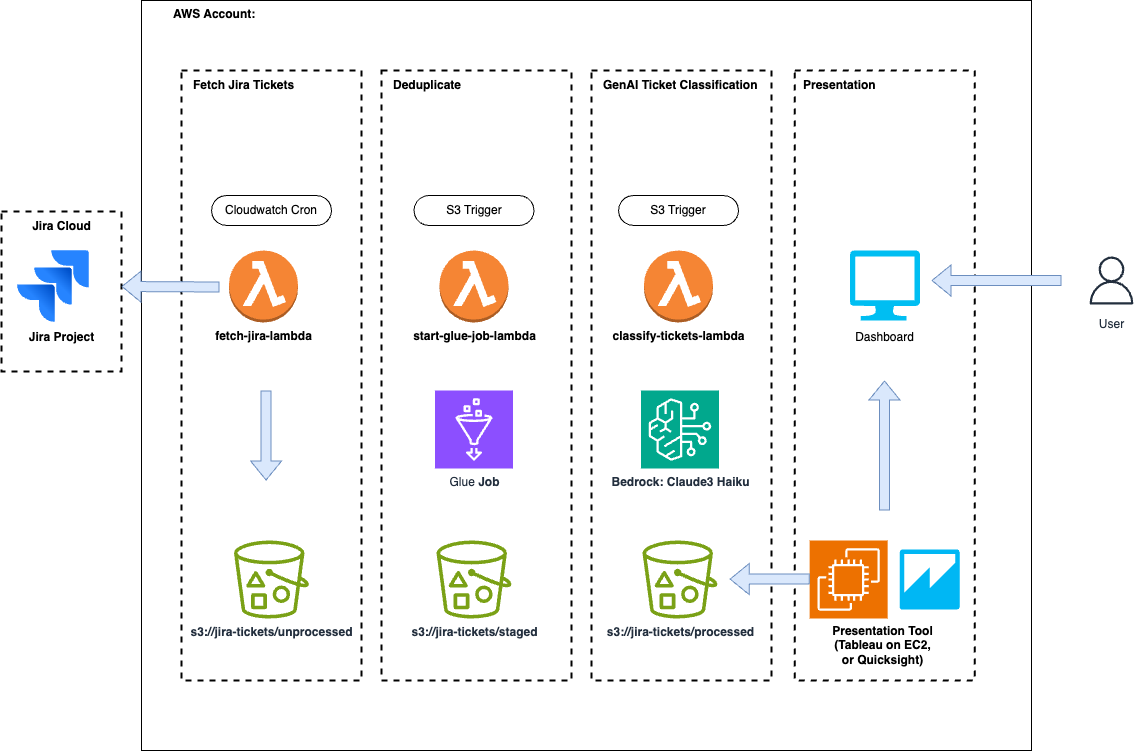
Step 1: An AWS Lambda function is triggered on a cron job to fetch Jira tickets
based on a time window. Those tickets are then formatted and pushed to an S3 bucket
under the /unprocessed prefix.
Step 2: A Glue job is triggered off /unprocessed object puts. This runs a
PySpark deduplication task to ensure no duplicate tickets make their way to the
dashboard. The deduplicated tickets are then put to the /staged prefix. This is
useful for cases where you manually upload tickets as well as rely on the automatic
fetch. If you can ensure no duplicates, you can remove this step.
Step 3: A classification task is kicked off on the new tickets by calling Amazon
Bedrock to classify the tickets based on a prompt to a large language model (LLM).
After classification, the finished results are pushed to the /processed prefix. From
here, you can pick up the processed CSV using any dashboarding tool you'd like that can
consume a CSV.
Getting Started
To get started, clone the github repo above and move to the /terraform directory.
$ git clone https://github.com/aws-samples/jira-ticket-classification.git
$ cd jira-ticket-classification/terraform
Run terraform init, plan, & apply. Make sure you have Terraform installed on your
computer and the AWS CLI configured.
$ terraform init
$ terraform plan
$ terraform apply
Once the infrastructure is deployed into your account, you can navigate to AWS Secrets Manager and update the secret with your Jira Cloud credentials. You'll need an API key, base URL, and email to enable the automatic pull.
And that's it!
You can (1) wait for the cron to kick off an automatic fetch, (2) export the tickets to
CSV and upload them to the /unprocessed S3 bucket prefix, or (3) manually trigger the
Lambda function using a test.
How Does It Work?
Jira Fetch
Jira fetch uses a Lambda function with a CloudWatch cron event to trigger it. The Lambda pulls in the AWS secret and uses a GET request in a while loop to retrieve paginated results until the JQL query completes:
def fetch_jira_issues(base_url, project_id, email, api_key):
    url = f"{base_url}/rest/api/3/search"

    # Calculate the date 8 days ago
    eight_days_ago = (datetime.now() - timedelta(days=8)).strftime("%Y-%m-%d")

    # Create JQL
    jql = f"project = {project_id} AND created >= '{eight_days_ago}' ORDER BY created DESC"

    # Pass into params of request.
    params = {
        "jql": jql,
        "startAt": 0
    }
    all_issues = []

    auth = HTTPBasicAuth(email, api_key)
    headers = {"Accept": "application/json"}

    while True:
        response = requests.get(url, headers=headers, params=params, auth=auth)
        if response.status_code != 200:
            raise Exception(f"Failed to fetch issues for project {project_id}: {response.text}")

        data = json.loads(response.text)
        issues = data['issues']
        all_issues.extend(issues)

        if len(all_issues) >= data['total']:
            break

        params['startAt'] = len(all_issues)

    return all_issues
It then creates a string representation of a CSV and uploads it into S3:
def upload_to_s3(csv_string, bucket, key):
    try:
        s3_client.put_object(
            Bucket=bucket,
            Key=key,
            Body=csv_string,
            ContentType='text/csv'
        )
    except Exception as e:
        raise Exception(f"Failed to upload CSV to S3: {str(e)}")
Glue Job
An S3 event on the /unprocessed prefix kicks off a second Lambda that starts an AWS
Glue job. This is useful when there are multiple entry points that Jira tickets can
enter the system through. For example, if you want to do a backfill.
import boto3

# Initialize Boto3 Glue client
glue_client = boto3.client('glue')

def handler(event, context):
    # Print event for debugging
    print(f"Received event: {json.dumps(event)}")

    # Get bucket name and object key (file name) from the S3 event
    try:
        s3_event = event['Records'][0]['s3']
        s3_bucket = s3_event['bucket']['name']
        s3_key = s3_event['object']['key']
    except KeyError as e:
        print(f"Error parsing S3 event: {str(e)}")
        raise

    response = glue_client.start_job_run(
        JobName=glue_job_name,
        Arguments={
            '--S3_BUCKET': s3_bucket,
            '--NEW_CSV_FILE': s3_key
        }
    )
The Glue job itself is written in PySpark and can be found in the code repo. The
important takeaway is that it does a leftanti join using the issue IDs on the items in
the new CSV against all the IDs in the /staged CSVs.
The results are then pushed to the /staged prefix.
Classify Jira Tickets
This is where it gets interesting. As it turns out, using prompt engineering can perform on par, if not better, than a text classification model using a couple of techniques.
- You can define the classifications and their descriptions in a prompt,
- Ask the model to think step-by-step (Chain of Thought),
- And then output the classification without having to train a single model.
See the prompt below:
Note: It's important to validate your prompt using a human-curated subset of classified / labeled tickets. You should run this prompt through the validation dataset to make sure it aligns with how you expect the tickets to be classified.
SYSTEM_PROMPT = '''
You are a support ticket assistant. You are given fields of a Jira ticket and your task is to classify the ticket based on those fields

Below is the list of potential classifications along with descriptions of those classifications.
<classifications>
ACCESS_PERMISSIONS_REQUEST: Used when someone doesn't have the write permissions or can't log in to something or they can't get the correct IAM credentials to make a service work.
BUG_FIXING: Used when something is failing or a bug is found. Often times the descriptions include logs or technical information.
CREATING_UPDATING_OR_DEPRECATING_DOCUMENTATION: Used when documentation is out of date. Usually references documentation in the text.
MINOR_REQUEST: This is rarely used. Usually a bug fix but it's very minor. If it seems even remotely complicated use BUG_FIXING.
SUPPORT_TROUBLESHOOTING: Used when asking for support for some engineering event. Can also look like an automated ticket.
NEW_FEATURE_WORK: Usually describes a new feature ask or something that isn't operational.
</classifications>

The fields available and their descriptions are below.
<fields>
Summmary: This is a summary or title of the ticket
Description: The description of the issue in natural language. The majority of context needed to classify the text will come from this field
</fields>

<rules>
* It is possible that some fields may be empty in which case ignore them when classifying the ticket
* Think through your reasoning before making the classification and place your thought process in <thinking></thinking> tags. This is your space to think and reason about the ticket classificaiton.
* Once you have finished thinking, classify the ticket using ONLY the classifications listed above and place it in <answer></answer> tags.
</rules>'''

USER_PROMPT = '''
Using only the ticket fields below:

<summary_field>
{summary}
</summary_field>

<description_field>
{description}
</description_field>

Classify the ticket using ONLY 1 of the classifications listed in the system prompt. Remember to think step-by-step before classifying the ticket and place your thoughts in <thinking></thinking> tags.
When you are finished thinking, classify the ticket and place your answer in <answer></answer> tags. ONLY place the classifaction in the answer tags. Nothing else.
'''
We've added a helper class that threads the calls to Bedrock to speed things up:
import boto3
from concurrent.futures import ThreadPoolExecutor, as_completed
import re
from typing import List, Dict
from prompts import USER_PROMPT, SYSTEM_PROMPT

class TicketClassifier:
    SONNET_ID = "anthropic.claude-3-sonnet-20240229-v1:0"
    HAIKU_ID = "anthropic.claude-3-haiku-20240307-v1:0"
    HYPER_PARAMS = {"temperature": 0.35, "topP": .3}
    REASONING_PATTERN = r'<thinking>(.*?)</thinking>'
    CORRECTNESS_PATTERN = r'<answer>(.*?)</answer>'

    def __init__(self):
        self.bedrock = boto3.client('bedrock-runtime')

    def classify_tickets(self, tickets: List[Dict[str, str]]) -> List[Dict[str, str]]:
        prompts = [self._create_chat_payload(t) for t in tickets]
        responses = self._call_threaded(prompts, self._call_bedrock)
        formatted_responses = [self._format_results(r) for r in responses]
        return [{**d1, **d2} for d1, d2 in zip(tickets, formatted_responses)]

    def _call_bedrock(self, message_list: list[dict]) -> str:
        response = self.bedrock.converse(
            modelId=self.HAIKU_ID,
            messages=message_list,
            inferenceConfig=self.HYPER_PARAMS,
            system=[{"text": SYSTEM_PROMPT}]
        )
        return response['output']['message']['content'][0]['text']

    def _call_threaded(self, requests, function):
        future_to_position = {}
        with ThreadPoolExecutor(max_workers=5) as executor:
            for i, request in enumerate(requests):
                future = executor.submit(function, request)
                future_to_position[future] = i
            responses = [None] * len(requests)
            for future in as_completed(future_to_position):
                position = future_to_position[future]
                try:
                    response = future.result()
                    responses[position] = response
                except Exception as exc:
                    print(f"Request at position {position} generated an exception: {exc}")
                    responses[position] = None
        return responses

    def _create_chat_payload(self, ticket: dict) -> dict:
        user_prompt = USER_PROMPT.format(summary=ticket['Summary'], description=ticket['Description'])
        user_msg = {"role": "user", "content": [{"text": user_prompt}]}
        return [user_msg]

    def _format_results(self, model_response: str) -> dict:
        reasoning = self._extract_with_regex(model_response, self.REASONING_PATTERN)
        correctness = self._extract_with_regex(model_response, self.CORRECTNESS_PATTERN)
        return {'Model Answer': correctness, 'Reasoning': reasoning}

    @staticmethod
    def _extract_with_regex(response, regex):
        matches = re.search(regex, response, re.DOTALL)
        return matches.group(1).strip() if matches else None
Lastly, the classified tickets are converted to a CSV and uploaded to S3:
import boto3
import io
import csv

s3 = boto3.client('s3')

def upload_csv(data: List[Dict[str, str]]) -> None:
    csv_buffer = io.StringIO()
    writer = csv.DictWriter(csv_buffer, fieldnames=data[0].keys())
    writer.writeheader()
    writer.writerows(data)

    current_time = datetime.now().strftime("%Y%m%d_%H%M%S")
    filename = f"processed/processed_{current_time}.csv"

    s3.put_object(
        Bucket=self.bucket_name,
        Key=filename,
        Body=csv_buffer.getvalue()
    )
Dashboarding
The project is dashboard agnostic. Any popular tool/service will work as long as it can consume a CSV. Amazon QuickSight, Tableau, or anything in between will do.
Conclusion
In this blog we discussed using Bedrock to automatically classify Jira tickets. These enriched tickets can then be used to create dashboards using various AWS services or third-party tools. The takeaway is that classifying text has become much simpler since the adoption of LLMs, and what would have taken weeks can now be done in days.